Monthly export
Under Invoices › Export you download finished invoices and credit notes for your accounting or archive, for example once a month.
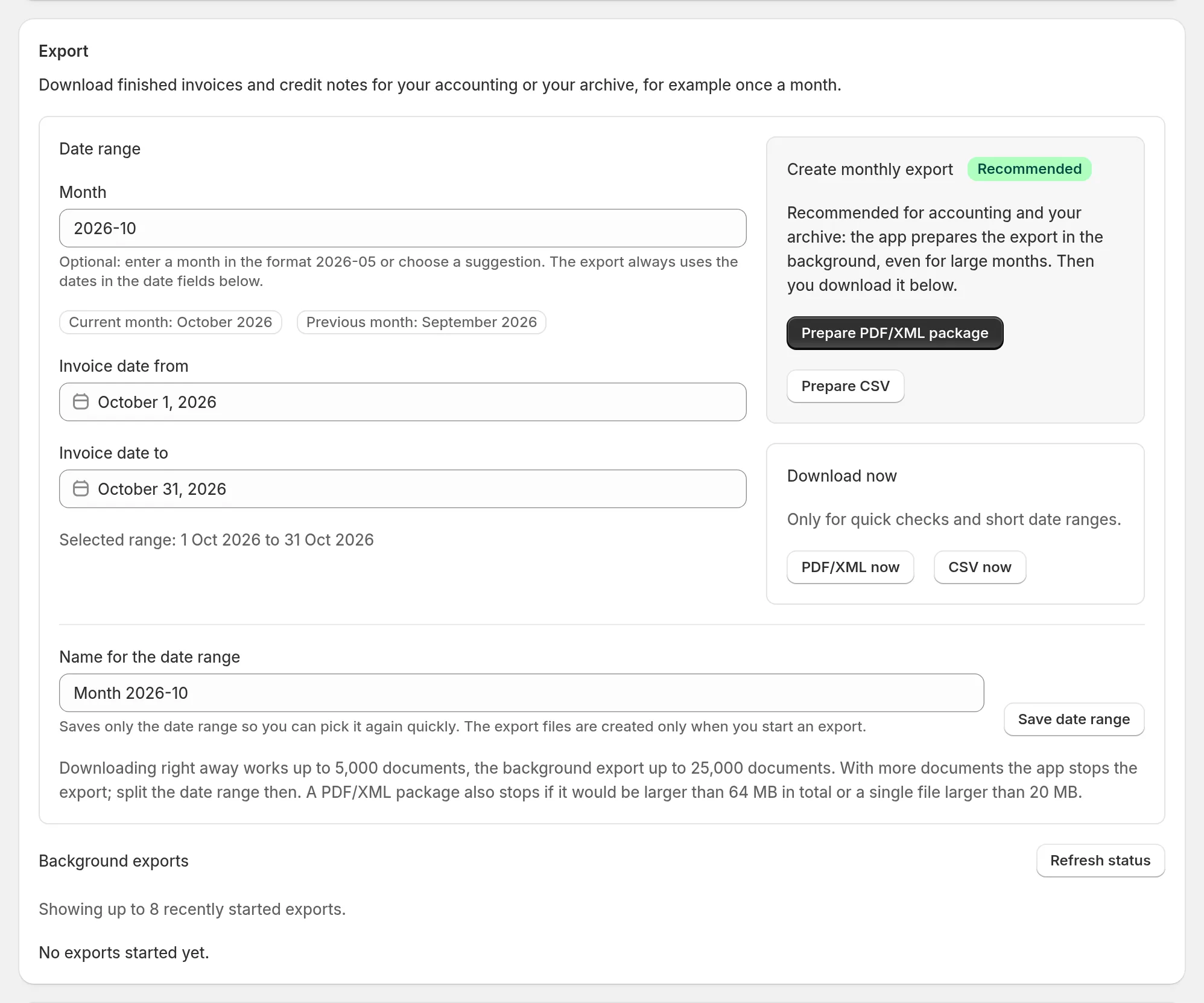
- Prepare PDF/XML package (recommended): the app prepares a ZIP in the background with the PDFs, the e-invoices (XML), the validation reports and an overview list. Then you download it below.
- Prepare CSV: a list of all documents in the period. The CSV is only an overview; the documents themselves are in the PDF/XML package.
- Download now: only for quick checks and small periods. This is also where you find the OSS summary (CSV) and the DATEV export (booking batch + documents), see below.
Current month and Previous month pick the period with one click. You can save frequent periods under a name.
DATEV export
The DATEV export (booking batch + documents) is a ZIP file for your accountant: a booking batch in DATEV format (EXTF) with all invoices and credit notes of the period plus the PDF documents, named after the document number. Your accountant imports the file into DATEV.
Set it up under Settings › DATEV export:
- Consultant number and client number – your accountant gives you both.
- Chart of accounts SKR03 or SKR04, account length (usually 4) and the month your fiscal year starts.
- Debtor account (collective debtor): all customers run through this account; empty = 10000.
- Revenue accounts: left empty, the DATEV automatic accounts for 19%, 7%, export, intra-community supply and tax-free revenue under § 4 No. 8 ff. UStG are used. Small-business revenue (§ 19 UStG) and other 0% revenue (zero rate, not taxable) have no default account: enter your accountant’s account as soon as such documents occur, otherwise the export stops. Change the other accounts only if your accountant asks.
- I use the OSS procedure: sales to consumers in other EU countries then go to the OSS revenue account, with OSS tax key, country of delivery and its VAT rate.
The DATEV export is only available for sellers based in Germany with documents in euro. The period must lie within one fiscal year and one calendar year. If something does not fit, such as a missing account for a tax case, the export stops and tells you why. There is no online connection to DATEV.
OSS summary
The OSS summary (CSV) gives you the totals for your OSS return: sales to consumers in other EU countries per country of delivery and VAT rate, credit notes deducted. Credit notes for sales from earlier quarters are marked. Amounts are in the document currency; convert them to euro for the return if needed. You file the return yourself; there is no OSS threshold monitoring.
Limits
- Downloading right away works up to 5,000 documents, the background export up to 25,000 documents. With more documents, split the period.
- A PDF/XML package also stops if it would be larger than 64 MB in total or a single file larger than 20 MB.
- The page lists up to eight most recently started background exports.
Archive and retention
The app does not replace an archive for statutory retention periods. Download your documents regularly and keep them in your accounting or filing system.
Before uninstalling: download your complete archive. About 48 hours after uninstalling, Shopify requests deletion of the shop data; the app then permanently deletes all stored documents of this shop.
Accounting software
There is no online connection to DATEV, Lexware Office, sevdesk or other accounting software. Hand-over works through the PDF/XML package, the CSV and the DATEV export. Many programs read the e-invoice (ZUGFeRD) straight from the PDF.